

AI in Automated Testing: Faster Work, Less Routine, Better Quality
Automated testing has become a critical part of modern software development, yet even mature QA teams spend significant effort on repetitive activities such as creating similar test cases, preparing test data, maintaining automation scripts, analyzing failed pipelines, and updating tests after product changes. AI is changing how QA teams approach these challenges, helping engineers streamline workflows and make faster, data-driven decisions throughout the testing process — not by replacing existing workflows, but by supporting engineers in areas where automation, analysis, and intelligent assistance can improve efficiency.

Expert opinion
“The biggest value of AI in testing is not generating more scripts. It acts as an assistant that handles routine work, accelerates investigation, and allows QA engineers to focus on test strategy, product risks, and user experience.”
— Alena Bogomaz, QA Lead at Gilzor
How AI Improves Automated Testing
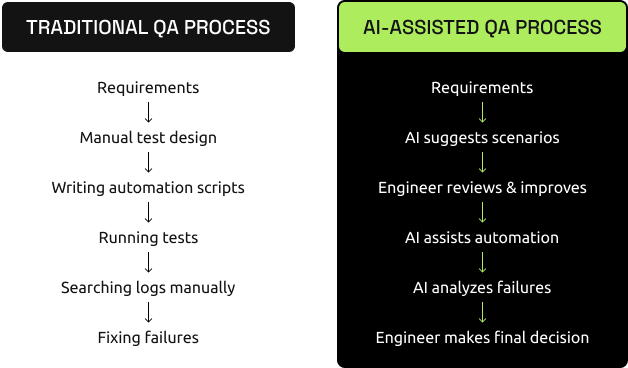
AI can support almost every stage of the testing lifecycle — from creating test scenarios to analyzing failures in CI/CD pipelines.
Instead of manually searching through multiple files, logs, and reports, engineers can use AI to:
- generate initial test scenarios based on requirements;
- suggest edge cases and negative scenarios;
- create automation code following existing project patterns;
- prepare test data and reusable components;
- analyze failed tests and identify possible causes;
- improve test documentation and reports.
The result is not “fully automated testing”. The result is a faster workflow where engineers spend less time on repetitive operations and more time making quality decisions.
Where AI Helps in Software Testing
AI can support different testing areas depending on the application architecture and team needs.
Expert insight
“AI is especially useful when teams need to analyze large amounts of testing information — from requirements and logs to failed test results. It can speed up investigation and suggest possible solutions, but QA experience remains essential for understanding the real impact and making the right decisions.”
— Alena Bogomaz, QA Lead at Gilzor
Using AI Prompts to Reduce Routine QA Work
Teams can prepare reusable prompts for common testing activities. This makes AI usage consistent and removes the need to explain the same requirements repeatedly.
Creating a test
"Create an automated test for this user journey. Follow the existing project structure and naming conventions. Reuse shared components where safe, add suitable synchronization, and include positive and negative scenarios. Do not modify unrelated tests."
Investigating a failure
"Analyze the attached test logs and screenshots. Identify the root cause, distinguish an application defect from a test issue, and propose the smallest safe fix. List any other tests that could be affected."
Reviewing regression risk
"Compare this branch with the main branch. Identify modified shared components, find all tests that use them, and classify the regression risk as low, medium, or high."
Generating API coverage
"Generate API test scenarios from this specification. Include authentication, validation, invalid input, boundary values, permissions, error responses, and schema checks."
Reviewing test quality
"Review this automated test for unstable selectors, duplicated steps, unnecessary waits, weak assertions, hidden dependencies, and possible CI timing problems."
Pre-prepared prompts allow teams to automate parts of their working process, not just individual test scripts. AI handles repetitive analysis while engineers retain control over the final decisions.
Built by Gilzor
Results we’ve shipped



Talk to the people who build it. Tell us about your project and get a free estimate of scope, timeline and cost.
AI Testing Tools: Which Ones Are Useful?
Different tools solve different problems.
Teams do not need to adopt every available AI tool. The right combination depends on the existing technology stack, security requirements, testing goals, and development process. In many cases, the most effective approach is combining a general AI assistant with specialized testing tools.
Human Expertise Remains Essential
AI-generated tests and recommendations always require human review. A successful test run does not automatically mean the software is correctly tested.
QA engineers still need to ensure that:
- Assertions verify meaningful behavior
- Retries do not hide real defects
- Test data is safe and appropriate
- Shared changes do not break unrelated tests
- Tests remain understandable and maintainable
- Security and privacy requirements are respected
- Generated code follows project standards
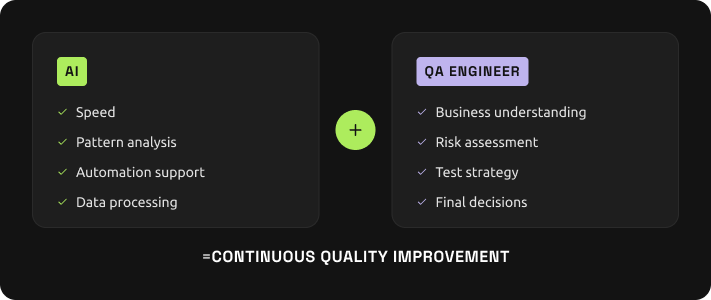
The strongest results come from collaboration between AI capabilities and human expertise.
Conclusion
AI can improve almost every part of automated testing — from creating test scenarios and automation scripts to analyzing CI/CD failures and maintaining test suites.
It helps QA teams:
- reduce repetitive work;
- investigate issues faster;
- improve test coverage;
- deliver software more reliably.
But AI does not replace quality engineers.
Its real value is allowing QA specialists to spend more time on strategic activities: understanding risks, designing better coverage, identifying important defects, and improving the overall product experience.
The future of testing is not AI instead of humans. It is AI working together with experienced QA engineers to build better software faster.
Meet the expert behind this article

Alena Bogomaz is a QA Lead specializing in test automation, software quality engineering, and building reliable testing processes for modern web, mobile, and backend applications.
Need help improving your QA automation process?
Building reliable automated testing requires the right strategy, tools, and engineering approach.
Our QA engineers help companies improve test coverage, automate testing workflows, identify risks earlier, and integrate quality assurance into modern software development processes.
No sales pitch
Get a straight answer for your project
Tell us what you’re building. We’ll reply with options, a rough cost and timeline. If we’re not the right fit, we’ll say so.

Gilzor · Quality Assurance partner
Need a team for your product QA?
Services
Quality AssuranceManual, automated and performance testing.→By company type
Selected projects


The team behind them





